


Download Abstract Coloring Book – free digital coloring app for stress relief
Overview
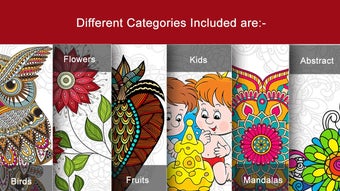
In today’s fast‑paced world, finding a pocket‑size sanctuary for mindfulness can feel impossible. Abstract Coloring Book steps in as a free, lightweight app that transforms any smartphone or tablet into a personal coloring studio. Built around the therapeutic power of doodling, the app offers a massive library of high‑resolution black‑and‑white illustrations ranging from intricate mandalas and graceful birds to flowing floral patterns and modern abstract sketches.
Each design is rendered in crisp vector format, allowing you to zoom in indefinitely without losing clarity—perfect for filling the tiniest details with precision. The intuitive colour tray sits at the bottom of the screen, giving you instant access to a palette of vibrant hues, pastel tones, and even custom hex codes for those who love to experiment. With a simple tap, drag, or pinch‑to‑zoom, users can effortlessly switch between brushes, adjust opacity, and undo any mistake, making the experience both relaxing and forgiving.
Whether you’re a seasoned colorist looking for a new digital canvas or a beginner seeking a calm, screen‑based escape, Abstract Coloring Book delivers a seamless blend of creativity and meditation. Its minimalist UI, offline functionality, and regular free updates ensure that you can unwind whenever and wherever you need a moment of calm.
Key Features and Tools
- Vast Image Library: Over 500 unique designs, continuously expanded with seasonal collections.
- Unlimited Zoom: Vector‑based artwork lets you zoom to 500 % without pixelation, ideal for intricate patterns.
- Custom Colour Palette: Choose from preset swatches, gradient mixes, or enter exact hex codes.
- Multiple Brush Types: Soft pastel, bold marker, textured watercolor, and eraser for fine‑tuned control.
- Layer Management: Organize complex pieces by creating separate layers for background, foreground, and details.
- Undo/Redo Stack: Up to 50 actions can be reversed, giving you freedom to experiment.
- Export Options: Save finished artwork as PNG, JPEG, or PDF for sharing on social media or printing.
- Offline Access: All images are stored locally after first download, so you can color without an internet connection.
- Auto‑Save & Cloud Sync: Optional Google Drive or iCloud sync keeps your progress safe across devices.
- Mindful Timer: Built‑in meditation timer encourages focused coloring sessions of 5, 10, or 20 minutes.
Beyond the listed features, the app embraces a clean, distraction‑free interface that puts the artwork front and centre. The colour tray automatically collapses when you’re zoomed in, maximizing screen real estate for detailed work. A subtle haptic feedback reinforces each brushstroke, making the digital experience feel surprisingly tactile.
For those who love to share, a one‑tap “Share” button posts your masterpiece directly to Instagram, Facebook, or Pinterest, complete with a built‑in watermark option to protect your creative rights. The developers also listen closely to community feedback, rolling out seasonal theme packs and occasional limited‑time challenges that keep the coloring experience fresh and engaging. All of these elements combine to create a robust, yet approachable tool that helps users unwind, boost focus, and unleash their inner artist—all without the mess of traditional media.
Installation & Usage Guide
Step‑by‑Step Installation
- Open the Google Play Store (Android) or App Store (iOS) on your device.
- Search for “Abstract Coloring Book” and locate the official free app published by Mindful Creations.
- Tap Install (Android) or Get (iOS). The download size is approximately 45 MB, and the process typically completes within a few minutes on a stable Wi‑Fi connection.
- Once installed, launch the app and grant permission to access your device’s storage. This enables you to save and export finished images.
- If you wish to sync across devices, sign in with your Google or Apple ID when prompted. This step is optional but recommended for cloud backup.
First‑Time Use & Navigation
Upon opening the app, you’ll be greeted by a simple home screen showcasing three main tabs: Gallery, Favorites, and Settings. The Gallery displays the entire image library, sortable by category (Mandala, Nature, Abstract, etc.). Tap any thumbnail to open the editor. In the editor, the colour tray appears at the bottom, while the canvas occupies the majority of the screen. Pinch‑to‑zoom lets you focus on tiny sections, and a two‑finger rotation gesture adjusts the canvas orientation for better ergonomics.
To start coloring, select a hue from the tray, then simply drag your finger across the lines you wish to fill. The app automatically detects closed shapes and applies colour within the boundaries, eliminating the need for precise brush strokes. For more control, switch to “Brush Mode” where you paint manually, adjusting brush size and opacity via sliders on the right side. The “Eraser” tool works identically, letting you correct any mis‑coloured area instantly.
When you’re satisfied with a piece, tap the Export icon in the top‑right corner. Choose your preferred file format, set the resolution (up to 300 dpi for print quality), and hit Save. The image is stored in your device’s photo gallery and can be shared directly from the app. Regular updates, typically released every 4–6 weeks, introduce new artwork packs, bug fixes, and performance enhancements—all delivered automatically via the store’s update mechanism.
Compatibility and System Requirements
Abstract Coloring Book runs smoothly on the latest mobile operating systems while maintaining backward compatibility with older versions:
- Android: 5.0 (Lollipop) and above; optimized for devices with at least 2 GB RAM and 100 MB free storage.
- iOS: 12.0 and later; compatible with iPhone SE (1st generation) onward and all iPad models supporting iOS 12.
- Tablet Support: Full‑screen mode and split‑screen multitasking on Android tablets and iPadOS.
- Screen Resolutions: Adaptive UI scales from 720p phones up to 4K tablets and monitors (via Android’s “Desktop mode”).
The app leverages the device’s GPU for smooth rendering, ensuring that zoom and brush actions remain lag‑free even on mid‑range smartphones. For the best experience, we recommend enabling hardware acceleration in your device’s developer settings (usually enabled by default). The app also respects system‑wide dark mode preferences, automatically switching its UI theme to match your device’s appearance settings.
Because the image assets are stored locally after the first launch, the app’s performance does not depend on a constant internet connection. However, an online connection is required for cloud sync, automatic updates, and downloading new seasonal packs. Users on limited data plans can restrict background data usage in the device’s settings, ensuring the app only syncs when connected to Wi‑Fi.
Pros, Cons, and Frequently Asked Questions
Pros
- Completely free with no hidden in‑app purchases.
- Huge library of high‑quality, vector‑based images.
- Intuitive UI that’s perfect for both beginners and advanced users.
- Robust colour and brush customization options.
- Offline functionality allows coloring anywhere.
- Export in multiple formats, ready for printing or sharing.
Cons
- No built‑in social community within the app (must use external platforms).
- Limited to mobile devices; no dedicated desktop version.
- Advanced layer features may be overwhelming for casual users.
FAQ
Is Abstract Coloring Book truly free?
Yes, the app is completely free to download and use. All core features, including the full image library and export options, are available without any subscription or in‑app purchases.
Can I share my finished artwork directly from the app?
Absolutely. The app includes a one‑tap share button that posts your image to Instagram, Facebook, Twitter, or Pinterest. You can also save the file locally and share it manually.
Does the app support custom colour palettes?
Yes. In addition to the preset swatches, you can input exact hex colour codes or create gradient mixes, allowing endless creative possibilities.
What happens to my work if I uninstall the app?
All exported files remain in your device’s gallery. If you have enabled cloud sync, your projects are stored in Google Drive or iCloud, and can be restored after reinstalling the app.
Is there a way to limit screen time while using the app?
Yes, the built‑in Mindful Timer lets you set a specific duration (5, 10, or 20 minutes). When the timer ends, a gentle chime reminds you to pause, helping maintain a healthy balance.
Overall Rating: 4.5/5 – A powerful, free coloring solution that delivers a calming creative outlet without any cost.
Conclusion & Call to Action
Abstract Coloring Book proves that high‑quality, stress‑relieving creativity doesn’t have to come with a price tag. By offering an expansive collection of vector illustrations, a rich set of colouring tools, and seamless offline access, the app positions itself as the go‑to digital sanctuary for anyone seeking mindfulness through art. Its cross‑platform compatibility ensures that whether you’re on Android or iOS, you can pick up a brush (or finger) and dive straight into a calming session. While the lack of a built‑in community may deter some, the robust export and sharing features more than make up for it, allowing you to showcase your masterpieces wherever you like.
If you’re ready to replace screen scrolling with a soothing splash of colour, Free download today and start your journey toward a more relaxed, focused mind. Remember, each stroke is a step away from stress and a step toward creativity. Happy coloring!







